
Our Days Co-Parenting Calendar
Our Days AdminParenting
4.494.00 Reviews
- Version
- 5.0.2
- Installs
- 10.00K
- Age Rating
- Everyone
Screenshots



Our Review of Our Days Co-Parenting Calendar
 Analysis by Appyee
When two households are trying to keep a child’s week running smoothly, small scheduling misunderstandings can become surprisingly stressful. I see Our Days Co-Parenting Calendar as a practical place to organize that shared routine: a parenting app built around calendar coordination, with messaging and event details alongside it. Its focus is useful precisely because it does not try to be an all-purpose family organizer. The central question is whether both adults will use one shared plan consistently.
A focused tool for a shared routine
The app is developed by Our Days Admin, and its current version is 4.5.11. It has been available since December 18, 2020, and the steady version numbering suggests an established product rather than a brand-new experiment. That history is worth noting, but it does not tell me exactly what changed between releases; I would treat the current app as the evidence of what a new user can expect, not assume a particular feature was added in a particular update.
Its store average is 4.5 from around 184 ratings, with roughly 94 written reviews and over 10,000 installs. That is a useful sign that other families have tried it, though ratings cannot predict whether the app will suit a particular co-parenting arrangement. It is free to install, is rated for Everyone, and offers in-app purchases ranging from $4.99 to $47.99 per item. I would check the purchase details in the app before relying on any paid option as part of a shared routine.
Why the calendar matters in practice
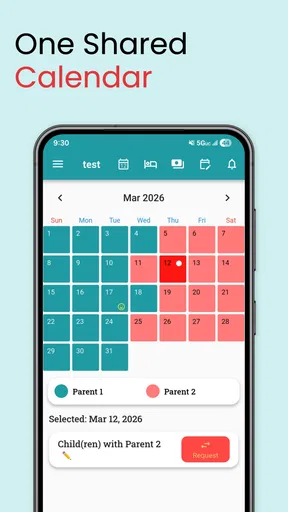
The most useful way to approach a shared parenting calendar is to treat it as the agreed reference point, rather than one more place to copy information after plans have already been made. I would start by entering the recurring handover pattern, then add exceptions such as school events, appointments, or a one-off change of pickup. That makes the calendar easier to scan and gives both parents a clearer basis for spotting a clash before it becomes a last-minute exchange of messages.
A realistic example is a weekday when one parent expects to collect a child after school, while the other has arranged an appointment later that afternoon. Putting both commitments beside the relevant day—and attaching a note or document to the appointment when useful—can make the handoff details easier to find. The value is not that an app resolves disagreement; it is that a shared record can reduce the chance that a detail is buried in an old text thread.
For the best result, I would agree with the other parent on a simple entry habit: record a change as soon as it is confirmed, include the time and pickup detail, and use a note for anything that needs context. That small bit of coordination matters more than filling the calendar with every minor detail. If one person keeps the app current and the other does not check it, the shared view quickly stops being dependable.
How it fits beside familiar alternatives
Compared with a paper planner or a basic calendar app, a dedicated co-parenting tool can bring the schedule and related communication into one place. That can be helpful when each household needs to see the same event information without searching through separate message histories. It is also more purpose-focused than a broad family organizer that may include shopping lists, chores, or unrelated household planning.
The trade-off is that a shared calendar only helps if both adults are willing to use the same system. A regular calendar may be a better choice for parents who already share events comfortably through tools they both use, especially if they want fewer apps rather than a dedicated co-parenting space. A paper schedule can still work for a predictable routine, but it is less convenient when plans change while one parent is away from home. I would choose based on the actual coordination problem, not simply because a co-parenting label sounds more specialized.
Who is likely to get the most from it
I think the app makes the most sense for parents who regularly need to coordinate handovers, appointments, and school-related commitments across two homes. It may also help when one parent handles more of the planning, since a visible shared schedule gives the other a straightforward way to check upcoming events. The in-app messaging and event notes can keep relevant context close to the date it concerns, instead of scattering it across conversations.
It is less compelling for a family whose schedule is already stable and easy to coordinate by conversation, or for co-parents who do not want to communicate through a shared app. It is not a substitute for a direct conversation when a change is sensitive or disputed. I would also avoid treating a calendar entry as proof that a plan has been mutually agreed: the adults still need to confirm changes clearly, especially when they affect a child’s pickup or care.
Getting Started with Our Days
First things first—getting set up on the Our Days Co-Parenting Calendar is a breeze. You download it, sign up, and you’re ready to go. The interface is clean and intuitive, which is a big plus. It's like the app designers actually understand that parents don’t have time to fiddle around with complicated menus and settings.
The app allows you to create and manage shared calendars with your co-parent, which is the core feature here. You can add events, appointments, and even assign tasks. It's all about keeping everyone on the same page, literally and figuratively.
Features That Stand Out
One thing I love about the app is its notification system. You can set up reminders for important events, and trust me, no more missing your kid’s soccer game or that parent-teacher conference. The app gently nudges you with notifications, which is a lifesaver when you’re swamped with work or other responsibilities.
The color-coded calendar is another feature that I found handy. It lets you categorize events by type or person, making it super easy to glance at your schedule and know what’s coming up. It’s these little touches that make the app user-friendly and effective.
Communication Made Easy
Communication is key in co-parenting, and the app gets that right. There’s an in-built messaging system that allows you to chat with your co-parent without leaving the app. No more switching between apps or dealing with long text threads. Everything you need is in one place.
Moreover, you can attach notes or documents to specific events. This feature is particularly useful for sharing important information like medical records or school reports. Just upload and attach, and both parents have access.
Making the shared calendar dependable
To keep the calendar useful, I would distinguish between confirmed plans and details that are still being discussed. For example, enter an appointment once it is booked, then use a note to explain what the other parent needs to know. If a pickup time is tentative, say so in the message rather than letting a calendar entry look final. This is a small workflow choice, but it helps prevent the calendar from becoming a second source of confusion.
Color coding works best when the categories stay limited and intuitive. I would choose a consistent meaning for each color—such as distinguishing event types or responsibility—and explain that convention to the other parent. If every event gets a unique color, the visual overview becomes harder to read rather than easier. The point is to make the next handover obvious at a glance, not to create a detailed code nobody remembers.
Notifications are useful as prompts, but I would not rely on them as the only way to learn about a change. A reminder can help with an event already entered; it cannot compensate for a plan that was never added or a last-minute change that has not been communicated. For important arrangements, I would use the message function to make the change explicit and then update the calendar so the record matches the conversation.
Privacy, sensitive details, and practical judgment
The original appeal of keeping messages and event information together is convenience, but co-parents should still be thoughtful about what they attach. A school note or appointment detail may be useful to both adults; sensitive documents should be shared only when they genuinely help coordinate care. I would avoid using any shared calendar as a general archive for every private family record. Keeping entries relevant makes them easier to find and limits unnecessary exposure of personal information.
The app describes security as a priority, including encryption for data. That is reassuring, but good judgment still matters: use an appropriate device lock, be careful about who can access a signed-in phone, and avoid putting information in an event note that does not need to be there. For families with complicated privacy or custody concerns, I would decide what information belongs in a shared digital space before inviting the other parent to use it.
One practical question is whether both parents need to make entries. If one person is the main organizer, the app can still provide a shared view, but the routine will be more reliable when both adults know how to record changes and check upcoming events. Before depending on it, I would agree on who enters appointments, how quickly schedule changes should be added, and which channel to use if something urgent happens.
Security and Privacy
Now, let's talk about something that’s on everyone's mind—security. The app takes your privacy seriously. All your data is encrypted, and you can rest assured knowing that your personal information is safe and sound.
In today’s world, where data breaches are not uncommon, this security feature provides peace of mind. You can focus on what really matters—your kids—without worrying about your information being compromised.
Room for Improvement
While Our Days offers a lot, there are a few areas where it could improve. For one, the app could benefit from more customization options. Some users might find the existing templates a bit rigid. Adding more flexibility in event customization would be a welcome addition.
Additionally, while the app’s design is sleek, it might be a bit too minimalistic for those who prefer more visual elements. A few more icons or graphics could enhance the user experience without making it cluttered.
What I would check before settling in
The app is free to download, but in-app purchases are available, so I would look carefully at what is included before building a long-term routine around a paid feature. The listed purchase range runs from $4.99 to $47.99 per item. That range alone does not tell me which option a family needs; the sensible approach is to begin with the functions available to you and only pay if a specific limitation is affecting your coordination.
Device compatibility is another simple point to check before inviting the other parent: the app requires Android 6.0 or later. Since co-parenting tools depend on both people being able to access the same plan, compatibility on each person’s phone matters more than it would for an app used by just one household. I would make sure both adults can open and use it before moving important arrangements out of a familiar calendar.
As the app continues to be maintained, I would watch for changes that address the two frictions I notice most: flexibility in how events are organized and the visual clarity of a busy schedule. The current release number shows that the product has progressed through multiple versions, but version history by itself does not prove that either area has changed. For existing users, the practical test is whether an update makes their own routine easier without disrupting habits they already rely on.
Final Thoughts
Overall, the Our Days Co-Parenting Calendar app is a solid tool for any co-parenting family. It simplifies the chaos of scheduling and enhances communication, all while keeping your data secure. It’s not perfect, but with a few tweaks, it could easily be a must-have for co-parents everywhere.
Whether you’re newly navigating the co-parenting world or have been doing it for years, this app can make life a little bit smoother. So, if you’re looking for a way to streamline your family’s schedule and communication, give it a try. You might just find it’s exactly what you’ve been searching for.
My recommendation
I would try it when missed handover details, scattered appointment information, or repeated schedule questions are causing friction, and when both parents are prepared to keep one shared calendar current. Its combination of calendar entries, reminders, color coding, messages, and event attachments is a sensible fit for that specific job. It is not automatically better than a shared calendar the family already uses successfully, and it cannot make an uncooperative arrangement work by itself.
My overall view is positive but measured: this is a focused parenting app with a clear use case, not a replacement for thoughtful communication or a universal family-planning system. If the other parent will participate and the current level of customization suits your routine, it is worth considering. If you need extensive personalization, prefer a more visual interface, or want to keep coordination in an existing calendar, that alternative may feel more natural.
Verdict
Strengths of Our Days Co-Parenting Calendar
- User-friendly interface for easy navigation.
- Customizable reminders for important dates.
- Syncs smoothly across devices.
- Privacy-focused with secure data handling.
- Supports multiple languages for inclusivity.
Limitations of Our Days Co-Parenting Calendar
- Limited free version features.
- Requires internet for syncing.
- Occasional sync delays reported.
- No offline mode available.
- Some features need premium upgrade.
Similar Picks in This Category
View All
Family Space
Motorola Mobility LLC.3.9

شرطة الأطفال - مكالمة وهمية
Oub Apps4.1

Findmykids: Parental Control
LETEM LTD4.6

Pregnancy + | Tracker App
Philips Electronics UK Limited4.8

Policía de niños - para padres
Kids police4.7

Pregnancy App
Amila4.9
Frequently Asked Questions
What is Our Days Co-Parenting Calendar, and how does it work?
Our Days Co-Parenting Calendar is a mobile application designed to assist co-parents in managing and organizing their shared parenting schedule. It provides features like calendar synchronization, event reminders, and communication tools to help parents stay on the same page. The app aims to reduce conflicts by offering a clear and easy-to-use platform for coordinating parenting responsibilities.
Is Our Days Co-Parenting Calendar available on both Android and iOS?
Yes, Our Days Co-Parenting Calendar is available for download on both Android and iOS platforms. Users can find it on the Google Play Store for Android devices and the Apple App Store for iOS devices. It is designed to offer a seamless experience across both operating systems, ensuring accessibility for all users.
Does the app offer any privacy features to protect sensitive information?
Absolutely. Our Days Co-Parenting Calendar prioritizes user privacy by implementing robust security measures. The app ensures that all shared information, such as schedules and personal details, is protected through encryption. Users can also customize their privacy settings to control who can view and edit shared calendars and other information.
Are there any costs associated with using Our Days Co-Parenting Calendar?
Our Days Co-Parenting Calendar offers both free and premium versions. The free version includes basic features like event scheduling and reminders. For more advanced features, such as detailed reporting and priority support, users can opt for the premium subscription, which comes at a monthly or annual fee. Pricing details can be found in the app’s settings or on the download page.
How does the app handle communication between co-parents?
The app includes built-in messaging features that allow co-parents to communicate directly within the platform. This ensures that all discussions related to parenting are kept in one place, making it easier to track conversations and agreements. Users can also set notifications for new messages to stay informed and responsive.
